Friday, January 10, 2014

CJK with Solr for Libraries, part 7

This is the seventh of a series of posts about our experiences addressing Chinese, Japanese and Korean (CJK) resource discovery in SearchWorks, the Stanford University Libraries "catalog" built with Blacklight on top of our Solr index.

The last three posts were focused on diagnosing and mitigating the differences between the edismax and dismax query parsers, since edismax (and Solr release of 4.1 or later) is a prerequisite for a critical bug fix for CJK analysis.  Note that without this bug fix, one of our CJK experts referred to the search results we were getting as "inexplicable."

As a refresher, we recall our original mission from the first blog post in this series:

CJK Discovery Priorities


Chinese

  1. Equate Traditional Characters With Simplified Characters
  2. Word Breaks

Japanese

  1. Equate Traditional Kanji Characters With Modern Kanji Characters
  2. Equate All Scripts
  3. Imported Words
  4. Word Breaks

Korean

  1. Word Breaks
  2. Equate Hangul and Hancha Scripts

Solr Solutions to Leverage


We borrow from the second post in this series to remind ourselves which Solr tools interest us for our Solr CJK processing needs:

1.  CJKBigram Analysis


Tom Burton-West's blog post advises the use of a combination of overlapping bigrams and unigrams of CJK characters for multilingual discovery.  The CJKBigramFilter, new with Solr 3.6, allows us to generate both the unigrams and the bigrams for CJK scripts only:  perfect.

In the future, Solr may provide CJK dictionary-based segmentation (see LUCENE-4381 and SOLR-4123), but it doesn't exist yet.  The ability to provide your own rules for tokenizing has arrived, though!  See the javadoc for the ICUTokenizerFactory for more information.

An important note:  The CJKBigramFilter must be fed appropriate values for the token type.  This can be learned from the source code:
or from looking at Solr admin analysis. Currently, the tokenizers that assign such types are:

a. ICUTokenizer

Here is output from Solr admin analysis on a string with four different CJK scripts as well as latin.  Note the type attribute, which I highlighted in the label column on the left:

b.  StandardTokenizer 

Note that the StandardTokenizer output does not separate the Hangul character from the Latin characters at the end.
c. ClassicTokenizer 

I believe ClassicTokenizer will also assign token types, probably the same way StandardTokenizer does.

The WhitespaceTokenizer is an example of a Tokenizer that does not assign the types.  I have added spaces to the string to emphasize the difference in the token types assigned:
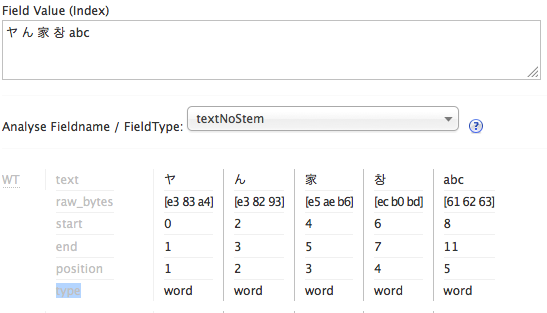
So we probably want to use the ICUTokenizer when we use the CJKBigramFilter.

2.  ICU Script Translations

Solr makes the following script translations available via the solr.ICUTransformFilterFactory:
  1. Han Traditional <--> Simplified
  2. Katakana <--> Hiragana
We would like to get more script translations (e.g.  Han <--> Hangul, more Japanese script translations), but to my knowledge, they are not readily available via Solr at this time.

3.  ICU Folding Filter

We have already been using solr.ICUFoldingFilterFactory for case folding, e.g. normalizing "A" to "a."  Even though CJK characters don't have the concept of upper and lower case, many CJK and other Unicode characters can be expressed multiple ways by using different code point sequences.  The ICUFoldingFilter uses NFKC Unicode normalization, which does a compatibility decomposition (using a broader, "compatible" notion of character equivalence and "decomposing" to distinct code points to represent separate-able parts of a character) followed by a canonical composition (the narrower, "canonical" notion of equivalence, and the more compact code point representation of characters).  We experimented with different flavors of Unicode normalization and found NFKC to be just fine for CJK discovery purposes.  I may talk about this further in a later post.

Solr Fieldtype Definition

The example schema provided with Solr shows one way you might configure a fieldtype to do CJKBigramming:
While it does use the CJKBigramFilterFactory, there are no script translations and it isn't using the ICUFoldingFilterFactory.  Note that this email clarifies that solr.CJKWidthFilterFactory normalizations are a subset of those in solr.ICUFoldingFilterFactory.

So our improved version of the above might look like this:
Spoiler Alert:  this is NOT our final fieldtype definition.

Let's examine it more closely:
  1. positionIncrementGap attribute on fieldType
  2. This setting is all about trying to keep your matches within a single field value for a multivalued field.  Bill Dueber explains it nicely in this blog entry.  Basically, the values in a multivalued field are stored adjacently, and this setting is the number of pretend tokens between the field values.  Thus, a large value keeps phrase queries from matching some words at the end of one field value, and some words in the beginning of the following field value.  Given that we will have tons of tokens for CJK strings (roughly 2 per CJK character, from the unigrams and overlapping bigrams), setting this to a nice high value is a good idea.
  3. autoGeneratePhraseQueries attribute on fieldType
  4. As LUCENE-2458 describes, prior to Solr 3.1, if more than one token was created for whitespace delimited text, then a phrase query was automatically generated.  While this behavior is generally desired for European languages, it is not desired for CJK.  Oddly, when this bug was fixed and a configuration setting was made available, they changed the default behavior - the default is now false. "false" is the correct value for CJK, while "true" is most likely what you want in other contexts.  The Jira ticket description is pretty readable;  Tom Burton-West also mentions this in his blog, and I briefly talk about it in my blog entry about upgrading from Solr 1.4 to Solr 3.5.
  5. ICUTokenizerFactory
  6. The section above on CJKBigram analysis shows that the ICUTokenizer is likely to be better than the StandardTokenizer for tokenizing CJK characters into typed unigrams, as needed by the CJKBigramFilter.
  7. CJKWidthFilterFactory
  8. It may be that this is completely unnecessary, but on the off chance that the script translations don't accommodate half-width characters, I go ahead and normalize them here.  For the curious, written CJK characters can be very opaque, so old printers used to print each CJK character twice as wide as a Latin characters.  However, some of the simpler characters could be printed regular size, or "half-width" compared to other CJK characters. (http://en.wikipedia.org/wiki/Halfwidth_and_fullwidth_forms)
  9. ICUTransformFilterFactory  from Han traditional to simplified
  10. This is the translation of traditional Han characters to simplified Han characters, which will allow a query to match both traditional and simplified Han characters.
  11. ICUTransformFilterFactory from Katakana to Hiragana
  12. This is the translation of Katakana characters to Hiragana characters, which will allow both of these scripts to be matched when there are characters in either script in the user query.
  13. ICUFoldingFilterFactory
  14. This will perform Unicode normalization as described in the Solr solutions section above.
  15. CJKBigramFilterFactory
  16. Note the settings to bigram all four CJK scripts, and to output unigrams in addition to bigrams.
So we now have a Solr fieldtype to create overlapping bigrams as well as unigrams for CJK script characters.  Super!

Our next step is to index all of our CJK data using this fieldtype, and then to include the new CJK fields in the boosted field lists searched by our edismax request handlers.

Where is our CJK Data?

In our preliminary testing, we confirmed SOLR-3589 made our CJK search results "inexplicable" (recall that this bug being fixed only for edismax is what drove us to switch to edismax).  One way we assessed our results was by comparing them to search results in our traditional library OPAC (Symphony ILS by Sirsi if you're curious).   For some of the very small result sets (15 hits or less), we could examine why each result was included by Solr and by the ILS.   These close examinations surfaced CJK characters that weren't in the appropriate Marc linked data 880 fields, but instead were included in Marc fields 505 and 520.  Many of these records came from external vendors.  We then asked our East Asia librarians to estimate how often CJK scripts would occur outside 880s, and the guesses were about 30% of the Chinese records, 15% of the Korean records, and 5% of the Japanese records.  With this in mind, we decided to apply the text_cjk fieldtype to 505 and 520 fields in addition to 880 fields.

Our CJK Solr fields are all copy fields (more on that in a subsequent post);  here are the relevant bits from our Solr schema.xml file, in addition to the fieldtype definition for text_cjk:


Note that the dynamicField declaration has indexed=true and stored=false:  the display of CJK text in the SearchWorks application is accommodated via other fields.  This whole effort is about CJK searching.  CJK search fields must be multivalued because many of the relevant Marc fields are repeatable.

Ready, Set, Index

The next posts in the series will talk about how we evaluated our indexing viz-a-viz CJK resource discovery, what additional indexing changes were required, and surprise changes needed in the SearchWorks rails application code.

Wednesday, January 8, 2014

CJK with Solr for Libraries, part 6 (Edismax woes, part 3)

This is the sixth of a series of posts about our experiences addressing Chinese, Japanese and Korean (CJK) resource discovery in SearchWorks, the Stanford University Libraries "catalog" built with Blacklight on top of our Solr index, and the third in the sub-series on problems we had switching to  edismax from dismax.

You might be interested in this post in particular if you use Solr's edismax query parser or if you want to get more exact matches for user queries.

Edismax Woes, Part 3

In part five of this series, I showed that our edismax results needed to give more weight to exact matches in the short title field in order to fix the failing relevancy acceptance tests for journal titles (and in order to behave more like dismax).

I also mentioned that Bill Dueber of the University of Michigan wrote a wonderful blog post on using "fully-anchored" text fields to get an "exactish" match.  This blog post will cover our solution to the journal title results using a fully-anchored text field.

What Do We Mean When We Say Exact?

Recall the results for an edismax title search on 'the press':


When we say "exact" match, our spec might be this:
  1. case insensitive.  
  2. field contains only those tokens we intend to match - it matches the entire contents of the field.  
  3. punctuation insensitive  (e.g. the nation should match "The nation.")
  4. Leading, trailing and consecutive whitespace insensitive.  
  5. Unicode folding.  
  6. possibly include synonyms.
It's not a phrase match, because that doesn't cover point 2 -- we don't want the first two results returned by edismax, even though they contain the phrase "the press".

A "good enough" solution, especially for short metadata fields, is to anchor the query string to the beginning and end of the field value, and to boost this "anchored" field type very high so will dominate the score when there's a match.

Anchored Text Fieldtype

Bill's blog post does a fine job of explaining how to do this.  Essentially, you add a prefix, like 'aaaa' to the beginning of the text, and you add a suffix, like 'zzzz' to the end of the text.

In our case, we have an unstemmed text fieldtype like this:


And we want to use a PatternReplaceCharFilterFactory to add the prefix and suffix to this field.  Bill's example is nice and simple:


Note that Bill's filter adds two tokens, which will affect mm counts.

I'm going to save you a lot of time and tell you right away:  be careful about your regular expression, especially concerning punctuation and other symbol characters.  Due to the Marc metadata standard having been originally designed to accommodate the printing of catalog cards, the short title fields in Marc data (245a) often end in punctuation and/or whitespace. 

Also, I didn't want to affect mm counts, because when we do bigramming for CJK characters, mm counts are going to be plenty tricky.  So here is what my version of the PatternReplaceCharFilterFactory to add anchoring prefix and suffix ended up as:


It's ugly, but it works.  It doesn't add tokens, like Bill's does, because it adds no whitespace to the token stream. 

Let's walk through the pattern:
   ^\s*
says ignore whitespace at the beginning of the text.
   [^\.\,:;/=&lt;&gt;\(\)\[\]\&amp;\|] 
is a character class excluding these characters: .,:;/=<>(){}&|    Let's call this character class z.

z is inside another character class:
   [\S&amp;&amp;z]
which, in total, says any non-whitespace character or a doubly escaped ampersand, but none of the characters excluded by z.  Let's call this modified non-whitespace character class \S'.

So the first part
   ^\s*(.*[\S&amp;&amp;[^\.\,:;/=&lt;&gt;\(\)\[\]\&amp;\|]]) 
is simplified to
   ^\s*(.*\S')
which is saying ignore beginning whitespace and capture anything after that ending in one of the characters in \S' (the modified non-whitespace character class).

The part after the capturing group contains another character class:
   [\s\.\,:;/=&lt;&gt;\(\)\[\]\&amp;\|]
which includes:  whitespace as well as .,:;=<>()[]&|.  Let's call this character class Y.  So after the capturing group, we have:
   Y*$
which is saying to ignore any trailing characters in the Y character class.  So the whole expression simplifies to:
   ^\s*(.*\S')Y*$

So it's not really so far off from Bill's pattern.  It ignores initial whitespace, it ignores trailing whitespace and punctuation, and it captures everything in between only if it ends with a non-whitespace character other than .,:;/=<>(){}&|

So yay!  We have a charFilter to place at the beginning of the fieldtype analysis chain and we're ready to create a new field for exactish matches to address the edismax relevancy discrepancy when compared to dismax!  Our anchored text fieldtype looks like this:


And we're ready to go, right?  We re-index our data, adding a Solr field:


in which we put our short title, (245a for Marc data wonks).  Then we add this Solr field to our edismax formula with a higher boost value than the other fields used by edismax in the failing journal title relevancy tests.  We can tweak the boost value as needed, since we have a safety net of 600 relevancy tests to let us know if we're breaking existing functionality.

And all the relevancy tests now all pass, right?

Wrong.  Do you see the problem?  I didn't.

The journal title search results passed the tests (after we addressed the problem of trailing punctuation, ahem).  But then we were left with a bunch of failing synonym tests, in addition to the already failing synonym tests from our 21 tests failing with edismax.

Synonyms and Anchoring

A synonym can be thought of as a substitution.  If you have
   c++  =>  cplusplus
in your synonym file, then analysis from the text_anchored fieldtype above will change
   Great C++ programming
to
   aaaaaagreat cplusplus programmingzzzzzz
This is perfect.  But if you start with
   C++ programming
then you get
   aaaaaac programmingzzzzzz

Why?   This is where the Analysis form in the Solr admin GUI came in handy.  It tells us the analysis for the text_anchored fieldtype above proceeds like this:
   C++ programming
   aaaaaaC++ programmingzzzzzz   <== pattern replace char filter
   aaaaaaC++ programmingzzzzzz   <== whitespace tokenizer (makes 2 tokens)
   aaaaaac++ programmingzzzzzz   <== ICU folding filter
   aaaaaac++ programmingzzzzzz   <== synonym filter  (no-op) 
   aaaaaac programmingzzzzzz     <== word delimiter filter

The synonym filter doesn't find "c++" as a token, it finds "aaaaaac++" which it doesn't know about.

Because our list of synonyms is short, and because I wanted to keep synonyms in our text_anchored fieldtype, my solution was to create additional synonyms for right, left and both anchored versions of each synonym to be mapped.  This covers cases where the synonym is the first, last or only word in the token stream for the text_anchored fieldtype.  For c++, this becomes these synonyms:

   c++  =>  cplusplus
   aaaaaac++  =>  cplusplus
   c++zzzzzz  =>  cplusplus
   aaaaaac++zzzzzz  =>  cplusplus

Here is what our text_anchored fieldtype actually looks like:


(you can also look here to see it with syntax highlighting:  https://github.com/solrmarc/stanford-solr-marc/blob/master/stanford-sw/solr/conf/schema.xml#L371-388).

Edismax Woes Begone!

Recall that our goal is to improve our edismax journal title results by giving great weight to exact-ish matches of the query string in a Solr document's short title field.  We have a field type for this, per above, that we use for an "exactish" short title field (245a for Marc data wonks).  Then we add this Solr field to our edismax formula with a higher boost value than the other fields used by edismax in the failing journal title relevancy tests.  We can tweak the boost value as needed, since we have a safety net of 600 relevancy tests to let us know if we're breaking existing functionality.

This is precisely how we fixed the failing journal title tests when using edismax.

Recall that our relevancy test failures with edismax were in the following categories:
  1. Journal titles
  2. Hyphens preceded by a space (but no following space)
  3. Boolean NOT
  4. Synonyms for musical keys
We addressed the journal titles with the fully-anchored exactish matching short title field.  We determined that the hyphens and boolean NOT failures were due to a Solr bug, and that we can ignore these failures for now.  And I'll go ahead and tell you that the failing synonym test was for a musical key (F#) that also maps to a computer language, and we decided to live with that failure for now.  (Maybe I'll talk more about our synonyms in a future post.)

Relevancy/Acceptance Tests

I want to make a point of mentioning that while we were trying to figure out why searches on "the nation" were failing our tests, we had human testers looking for other errors and trying to find the pattern to the problems we were already aware of.  So we got a lot more tests for similar journal titles, such as "the sentinel," "the chronicle", "the times" (which we already had), etc.  Eventually I realized the culprit for our journal title results was the punctuation at the end of the Marc 245a fields.  But in the meantime, we beefed up our test suite in this area.

Our relevancy tests were also instrumental in determining an appropriate boost value for our new short title exactish match field, both in title searches and in "everything" searches.   I was able to find out what was too low a boost and what was too high a boost by running my test suite against different values.

And of course, our relevancy tests were crucial in my effort to simplify our boost factors.

Please feel free to take ours (https://github.com/sul-dlss/sw_index_tests) and modify them for your own needs.   Ignore the ones that don't apply to you; add tests for your local needs. Improve on my methodology.  Feel free to get in touch.

Next:  Actually Working on CJK

Now that we've gotten past the difficulties with changing from dismax to edismax query parsing, we can utilize Robert Muir's fix for SOLR-3589, the bug that was setting mm to 0 for fields using CJKBigramming (this is discussed in the second post in this series).  We also upgraded to Solr 4.3 at this point (from 3.5), partly to get Robert's bug fix without having to apply a patch to Solr manually.

So the next post in this series will return to discussing work specific to CJK.

Tuesday, January 7, 2014

CJK with Solr for Libraries, part 5 (Edismax Woes, part 2)

This is the fifth of a series of posts about our experiences addressing Chinese, Japanese and Korean (CJK) resource discovery in SearchWorks, the Stanford University Libraries "catalog" built with Blacklight on top of our Solr index, and the second in the sub-series on problems we had switching to edismax from dismax.

You might be interested in this post in particular if you use Solr's edismax query parser or if you want to get more exact matches for user queries.

Edismax Woes, Part 2

In the third part of this series, I mentioned that we had 21 relevancy acceptance tests fail when we used the edismax Solr query parser instead of dismax.  Recall that our test failures were in the following categories:
  1. Journal titles
  2. Hyphens preceded by a space (but no following space)
  3. Boolean NOT
  4. Synonyms for musical keys
This blog post will discuss how we addressed relevancy failures in the first category;  I discussed failures in categories 2 and 3 in the fourth part of this series.

Digging Into Relevancy Differences

Here is example output from some failing tests in category 1:

  rspec ./spec/journal_title_spec.rb:22 # journal titles The Nation as everything search
  rspec ./spec/journal_title_spec.rb:32 # journal titles The Nation (National stems to Nation) with format journal

I used manual searches to confirm that users would perceive the edismax results as worse than dismax.  I also tried a number of similar searches (and wrote tests) to better pinpoint this problem.

Here are the first five results for a title search on The press using using dismax and edismax with the same index:


Looking at these results, I immediately have two questions:
  1. Why are the first two results of edismax not exact title matches?
  2. Why are the scores of the three documents that appear in both sets of results different?

Edismax Formula Difference

To answer these questions, I first looked at the Solr output with debugQuery=true.  The Solr query analysis was shown as exactly the same EXCEPT for this difference noted in SOLR-2058 in the comment from Michael Dodsworth on 25 Sep/12.

I'll try to express it more succinctly (thanks to Tom Burton-West) :

Let
  A = field1:"term1 term2"
  B = field2:"term1 term2"
  C = field3:"term1 term2"

Dismax:
    DisjunctionMaxQuery (A|B|C)
  returns the score of whatever field has the highest score.

Edismax:
    DisjunctionMaxQuery (A)
    DisjunctionMaxQuery (B)
    DisjunctionMaxQuery (C)
  returns the sum of the scores of each of any of the above queries that match.  So if your phrase is in all 3 fields, you get the sum of the scores for each matched field.

Unfortunately, SOLR-2058 is marked as fixed, despite this difference.  So we have an initial diagnosis, but not a treatment plan.

Visualizations To The Rescue!

I was stumped as to what to do about the above until I used the visualizations of Solr scoring data made available at explain.solr.pl.  The full visualizations I created for scoring the top 5 results of a search for 'the press' are available here:

edismax:  http://explain.solr.pl/explains/m63o1yhg
dismax:  http://explain.solr.pl/explains/a7bkurhb

Here is the visualization of the score of the first dismax result, id 9162486 with title The press:
The score is overwhelmingly dominated by the phrase match in the unstemmed short title field, title_245a_unstem_search.  In fact, this is true for all the top 5 dismax results:  if the pie charts below weren't different colors and didn't have text labels for the tiny pie pieces, I think you'd be hard pressed to tell them apart:


However, with edismax, we have two basic patterns within the first 5 results, and the phrase match in the unstemmed short title field is not nearly as dominant:


Here is a closer look at the visualization of the score of the first edismax result, id 8192320 with title MEET THE PRESS:

What I learned from these visualizations is that to make the edismax results more like dismax, I needed a way to give more weight to exact matches of the entire string in the title_245a_unstem_search field.

Another visualization example, of the top 5 results of a search for 'the nation':

edismax:  http://explain.solr.pl/explains/6bracmzw
dismax:  http://explain.solr.pl/explains/4med7pae

Tie Parameter

"DisMax" is an abbreviation of "disjunction maximum", which is a partial description of the way user queries are turned into low level Lucene queries.  From http://wiki.apache.org/solr/DisMax, dismax is "designed to process simple user entered phrases (without heavy syntax) and search for the individual words across several fields using different weighting (boosts) based on the significance of each field."  From the same document:


So basically, dismax pays attention only to the highest scoring query match in any of the document's fields.  The tie parameter, documented here, can be used to dial up the influence of other matches:


A tie value of 0.01 was used for both dismax and edismax searches.  That value is very close to zero, so the highest scoring matching clause should already be dominating the total score.  I tried a tie value of 0.99 to see if I could make a difference in the relevancy ranking this way, and while my document scores changed, the result order remained the same.   Below are results for edismax search for 'the press' with different tie values:

tie 0.01:  http://explain.solr.pl/explains/hwi1ma6x
tie 0.99:  http://explain.solr.pl/explains/jfmdli56


I coerced a colleague into trying a similar experiment, and was able to confirm the tie parameter affected his results as expected.  Further experimentation indicated that setting the tie value to something like 0.00001 for my search DID have the effect of making the highest scoring matching clause highly dominant;  this led me to the conclusion that my field boosting values were ridiculous (as high as 200,000 !) and affected my ability to use a reasonable value for the tie parameter..

Re-adjusting Boost Values

Our boost value settings were a big nasty kludge that I partly inherited and partly created. Simplifying them was definitely in order ... but perhaps not at the same time as a change to edismax, nor during a Solr upgrade from 3.5 to Solr 4.  Sure, having about 600 relevancy tests gave me a decent amount of confidence I could revise my boost values without degrading the user experience of relevancy, but upgrading to edismax was causing me plenty of difficulty without revising boost values.

Eventually, I did greatly simplify our boost values and our relevancy tests were indispensable to that process.   Of course I de-coupled this from fixing the problems we had with edismax, and again from the Solr upgrade from 3.5 to Solr 4.  You can see our simplified boost values in our solrconfig.xml file at https://github.com/solrmarc/stanford-solr-marc/blob/master/stanford-sw/solr/conf/solrconfig-slave.xml.   The highest boost value is now 5,000, a great reduction from 200,000.

However, in terms of addressing the relevancy test failures with edismax, adjusting the boost values and the tie parameter wasn't really part of the route taken.

Back to Edismax Woes

The visualizations of Solr scores helped us see that our edismax results need to give more weight to exact matches of the entire string in the short title (title_245a_unstem_search) field.  The tie parameter wasn't really working for us.  What now?

Bill Dueber of the University of Michigan wrote a wonderful blog post on using "fully-anchored" text fields to get an "exactish" match.   This approach seemed well worth a try.  I will discuss our fully-anchored solution in the next post in this series.

Monday, January 6, 2014

CJK with Solr for Libraries, part 4 (Edismax Woes, part 1)

This is the fourth of a series of posts about our experiences addressingChinese, Japanese and Korean (CJK) resource discovery in SearchWorks, the Stanford University Libraries "catalog" built with Blacklight on top of our Solr index.

You might be interested in this post in particular if you use Solr's edismax query parser.

Edismax Woes, Part 1

In the third part of this series, I mentioned that we had 21 relevancy acceptance tests fail when we used the edismax Solr query parser instead of dismax.   If I inserted the "e" in my solrconfig, I would see these test failures;  if I removed the "e", the tests would pass.  I had heard "edismax is better", but here I had proof positive that edismax was WORSE.

Our relevancy problems with edismax were unexpected blockers to improving CJK resource discovery:  recall that edismax is required to fix relevancy when using the CJKBigram filter (SOLR-3589) as mentioned in part two of this series.

I believe the intent is for edismax to be an exact equivalent of dismax with additional features ... but this is not true at this time.  It turns out that edismax has a number of unresolved bugs and unimplemented features (see SOLR-2368).

Recall that our test failures were in the following categories:
  1. Journal titles
  2. Hyphens preceded by a space (but no following space)
  3. Boolean NOT
  4. Synonyms for musical keys
I will discuss categories 2 and 3 in this blog post.

Edismax Bug with Boolean Operators

One of the unresolved bugs with edismax (see SOLR-2368 for a comprehensive list) is SOLR-2649, "MM ignored in edismax queries with operators."  This bug essentially means that if a Boolean operator, such as NOT or OR appears in the query string, then all terms in the query are effectively "OR'ed" together.  Note that 'AND' is unaffected;  the four operators affected are:  NOT, OR, - (prohibited), + (required). 

It turns out that all of our failing hyphen tests were queries with a space before but not after the hyphen, such as 'under the sea -wind.'   Solr interprets such a hyphen as a "prohibited" operator, which is the same as NOT, and such hyphens are included in bug SOLR-2649.  Thus, our failure categories 2 and 3 are essentially the same. 

Our default operator is AND and we set lowercaseOperators to false (see http://wiki.apache.org/solr/ExtendedDisMax#lowercaseOperators), so the SOLR-2649 bug means any query with terms of uppercase OR or NOT or a '-' or '+' character preceding a term gives unexpected results, unless the query has either explicit AND or explicit '+' for all other terms.  Our mm setting is 6<-1 6<90%, or high enough that 4 terms should be AND'ed together.

Here are some illustrative example user queries, how they are analyzed by Solr (via debugQuery=true), and the results:

DISMAX:
  q=customer driven academic library
    +(((custom)~0.01 (driven)~0.01 (academ)~0.01 (librari)~0.01)~4) ()
    4 hits
  q=customer NOT driven academic library:
    +(((custom)~0.01 -(driven)~0.01 (academ)~0.01 (librari)~0.01)~3) ()
    96 hits
  q=customer -driven academic library:
    +(((custom)~0.01 -(driven)~0.01 (academ)~0.01 (librari)~0.01)~3) ()
    96 hits
  q=customer academic library:
    +(((custom)~0.01 (academ)~0.01 (librari)~0.01)~3)()
    100 hits

EDISMAX
  q=customer driven academic library:
    +(((custom)~0.01 (driven)~0.01 (academ)~0.01 (librari)~0.01)~4)  
    4 hits
  q=customer NOT driven academic library:
    +((custom)~0.01 -(driven)~0.01 (academ)~0.01 (librari)~0.01)  
    984300 hits
  q=customer -driven academic library:
    +((custom)~0.01 -(driven)~0.01 (academ)~0.01 (librari)~0.01)
    984300 hits
  q=customer OR academic OR library NOT driven:
    +((custom)~0.01 (academ)~0.01 (librari)~0.01 -(driven)~0.01)
    984300 hits
  q=customer academic library:
     +(((custom)~0.01 (academ)~0.01 (librari)~0.01)~3)
    100 hits

You can see that the mm is missing from the middle 3 edismax queries (no ~3 term);  this is the manifestation of the bug.  You can also see how the number of results would be confusing to an end user.

Great - now we have learned there is a known Solr bug, and we understand its scope.  What shall we do?  The first, best option would be for someone else to fix the problem.  Given that the bug report is from July 2011 and heavily commented, that seems unlikely to happen soon.  The next best option is to fix the problem myself.  However, having already looked at the source code for edismax, I pale at the very thought.  

So I took a different tack:  I examined whether we had a significant number of user queries impacted by this bug.

Will Our Users Encounter this Bug?

Prior to the CJK improvements, SearchWorks has only supported boolean operators in its Advanced search.  Our usage data from July 2013 - November 2013, shows "advanced" is the initial search behavior somewhere between 6% and 18% of the time.   For example, here are stats for initial search behavior in July 2013:


And the analogous data for November 2013:


So let's be generous, and say that 20% of the SearchWorks queries use the boolean-enabled advanced searches.  Of those, how many contain boolean?

We looked at 10,000 advanced search queries culled from Google Analytics from July, 2013.  (Note that this could have been done via the Solr logs, but we have a load balanced Solr set up so it would have involved getting logs from 3 machines and their backups ... so we just went with Google Analytics.)  Using grep, we determined the following occurrences of the affected operators in an advanced search where SOLR-2649 might apply:

Thus, the boolean operators affected by SOLR-2649 occur extremely rarely in SearchWorks advanced search queries, which are themselves, at best 20% of our queries.

Armed with this data, we chose to let this remain broken in SearchWorks for the time being, so the failing relevancy tests in categories two and three above have been resolved as "do not fix" until the Solr bug is addressed.

Stay Tuned ...

In my next post, I will tackle the first category of failing relevancy tests, which required a work around to avoid degrading relevancy for our users when we switched to edismax.

Thursday, November 7, 2013

CJK with Solr for Libraries, part 3


This is the third of a series of posts about our experiences improving CJK resource discovery for the Stanford University Libraries.

We recently rolled out some significant improvements for Chinese, Japanese and Korean (CJK) resource discovery in SearchWorks, the Stanford library "catalog" built with Blacklight on top of our Solr index. If your collection has a significant number of CJK resources and they are in multiple languages, you might be interested in our recipes. You might also be interested if you have a significant number of resources in other languages with some of the same characteristics.

Relevancy Testing


In the second part of this series, I explained why SearchWorks needed to change from using the Solr dismax query parser to the edismax query parser.   I would not undertake nor recommend a fundamental change to your Solr query processing without a good testing methodology.  Nor would I change an index to accommodate CJK without a way to ensure it didn't break existing functionality.  Basically, it's a bad idea to change anything about query processing without a way to ensure it doesn't degrade existing relevancy.  This implies automated relevancy acceptance testing is needed.

Luckily for us, we have been doing automated relevancy testing for a while, first by using cucumber tests within our SearchWorks Blacklight Rails application, and now much more efficiently by using rspec-solr (http://rubydoc.info/github/sul-dlss/rspec-solr) to interact with Solr directly instead of going through the whole Rails application.  It allows our SearchWorks relevancy testing application, sw_index_tests (available at https://github.com/sul-dlss/sw_index_tests), to parse Solr responses and use rspec syntax to check whatever we want about the Solr documents returned, without going through the entire Rails stack.  I blogged about this a while back.

When we were about to switch to edismax to facilitate CJK discovery, we had around 580 relevancy tests in sw_index_tests, including tests for everything, author, title, subject and series search results, diacritics and punctuation in search terms, and journal titles, among other things.  These test searches (and their expected results) were amassed over a period of 3-4 years:  tests were written every time a tweak was made to address a problem, or when the indexing code changed for some other reason (e.g. providing call number searching).  These tests have never been comprehensive, but they are a lot better than nothing.  We run them against our live production index nightly via our Jenkins continuous integration server.  Sometimes we have to tweak the tests when records are added, removed, or changed in the production index, but that's easy.  The peace of mind knowing we have a way to do relevancy acceptance testing is well worth the trouble.

And in case you're wondering, we pass an additional http argument (testing=sw_index_tests) to Solr so we can easily segregate these test queries from actual user queries in the Solr logs:

Here are a few example tests from sw_index_tests:

Title:

Author


Journal Title

Diacritics
I will talk more about our CJK relevancy tests later;  my main point here is that we have automated tests to help us determine if anything breaks when we make changes to our Solr index or configurations, and you can do it too!   Heck, you can even use ours and change the acceptance conditions to be your ids and expected result numbers.

I would love to hear from anyone else who does automated relevancy testing, as it seems to be a rare thing.

Edismax != Dismax


Technically, to switch from the dismax query parser to the edismax query parser, you need only add the "e" to your Solr request handler defType declaration:
<requestHandler name="/search" class="solr.SearchHandler">
  <lst name="defaults">
    <str name="defType">edismax</str>
When we tried this, we had 21 failures out of approximately 580 tests.  The failures were in four categories:

1.  Journal title failures

Example of a failing test:
  rspec ./spec/journal_title_spec.rb:22 # journal titles The Nation as everything search
  rspec ./spec/journal_title_spec.rb:32 # journal titles The Nation (National stems to Nation) with format journal

2.  Queries having hyphens with a preceding space (but no following space)

Example of a failing test:
  ./spec/punctuation/hyphen_spec.rb:140 # 'under the sea -wind' hyphen in queries with space before but not after are treated as NOT in everything searches 

3.  Boolean NOT operator

Failing tests:
  ./spec/boolean_spec.rb:100 # boolean NOT operator  space exploration NOT nasa has an appropriate number of results
  ./spec/boolean_spec.rb:88 # boolean NOT operator  space exploration NOT nasa  should have fewer results than query without NOT clause

4.  Synonyms for musical keys.

We use Solr synonyms to equate the following (for all musical keys - the full list is here):
  f#, f♯, f-sharp => f sharp
  ab, a♭, a-flat => a flat
Failing tests:
  ./spec/synonym_spec.rb:204 # musical keys sharp keys f# major
  ./spec/synonym_spec.rb:316 # musical flat keys author-title search (which is a phrase search) b♭

Clearly, we needed to address these problems before we could use edismax in production SearchWorks, which means they needed to be fixed as a prerequisite for improving CJK discovery.

How to Analyze Relevancy Problems


Thankfully, there are some excellent tools for debugging relevancy problems.

1.  Solr query debugging parameters 

If you add debugQuery=true to your Solr request, then you will get debugging information in your Solr response.  If you are at Solr release 4.0 or higher, you could use debug=query instead.  Here is an example:
My request:
 http://(solr baseurl)/solr/select?q={! qf=$qf_author}zaring&debug=query
The debug query part of the response (simplified a bit):

We can see exactly which Solr fields and terms are being searched, and their boost factors.  This example shows different terms being searched in the stemmed and unstemmed version of the fields.  (Note: the decision to stem author fields was deliberate to allow users to find, say "Michaels, Amanda" when they query "Amanda Michael", or if they use "Crook" when the name is actually "Crooke".)

See http://wiki.apache.org/solr/CommonQueryParameters#Debugging for more information.

2.  Analysis GUI

Another Solr supplied tool is the Analysis form in the admin GUI.   This tool lets you see how each part of your analysis chain of tokenizer and filters affects the data according to field, field type, or dynamic rule in the Solr schema.

This shows, for Solr field author_1xx_search, at which point in the analysis chain "zaring" becomes "zare".   I entered "zare" as a query value, and the faint purple highlighting of the bottom two lines on the left field value side shows that zare and zaring will match for field author_1xx_search. 
Note that this is not an exact representation of query matching.  As an example, the lucene query parser on the client side breaks things up by whitespace before field analysis is performed for (e)dismax processing.

3.  Visualization of Individual Result Debug Information

The Solr debug information can also contain information on how the algorithm computed the relevancy ranking of a results, either with debugQuery=true, or debug=results for Solr 4.0 or higher.

Given the same Solr query string as above, with debug=results:
 http://(solr baseurl)/solr/select?q={! qf=$qf_author}zaring&debug=results
The explain part of the response (simplified a bit):
<lst name="debug">
... 
<lst name="explain">
  <str name="3928423">
9.0780735 = (MATCH) sum of:
  9.0780735 = (MATCH) max plus 0.01 times others of:
    9.056876 = (MATCH) weight(author_1xx_unstem_search:zaring^20.0 in 1075085) [DefaultSimilarity], result of:
      9.056876 = score(doc=1075085,freq=1.0 = termFreq=1.0
), product of:
        0.999978 = queryWeight, product of:
          20.0 = boost
          14.491322 = idf(docFreq=9, maxDocs=7231138)
          0.0034502652 = queryNorm
        9.0570755 = fieldWeight in 1075085, product of:
          1.0 = tf(freq=1.0), with freq of:
            1.0 = termFreq=1.0
          14.491322 = idf(docFreq=9, maxDocs=7231138)
          0.625 = fieldNorm(doc=1075085)
    2.1197283 = (MATCH) weight(author_1xx_search:zare^5.0 in 1075085) [DefaultSimilarity], result of:
      2.1197283 = score(doc=1075085,freq=1.0 = termFreq=1.0
), product of:
        0.24188633 = queryWeight, product of:
          5.0 = boost
          14.021318 = idf(docFreq=15, maxDocs=7231138)
          0.0034502652 = queryNorm
        8.763324 = fieldWeight in 1075085, product of:
          1.0 = tf(freq=1.0), with freq of:
            1.0 = termFreq=1.0
          14.021318 = idf(docFreq=15, maxDocs=7231138)
          0.625 = fieldNorm(doc=1075085)
</str>
This can be useful in determining why a particular document is (or isn't) included in the results, but it is difficult to eyeball the above and understand what is going on, even after you format it.

Thankfully, there is a web site in Poland, http://solr.pl/en/, that has a web service, http://explain.solr.pl/, to take your Solr explain info and visualize it as a pie chart.  This presents our result like this:


Suddenly, it is obvious why this document matches.

This is tool is even more useful for more complex (e)dismax formulae with a lot of fields to match, multi-term queries and documents matching different terms in different fields.  Check out some of our actual results while debugging the edismax difficulties here:

edismax:  http://explain.solr.pl/explains/m63o1yhg
dismax:  http://explain.solr.pl/explains/a7bkurhb


Stay Tuned ...


Now that I've explained our testing methodology and some of our debugging techniques, I'm ready to tell you how we overcame the relevancy issues we bumped into when switching to edismax.  That will be the topic of my next post(s).

Wednesday, November 6, 2013

CJK with Solr for Libraries, part 2

This is the second of a series of posts about our experiences improving CJK resource discovery for the Stanford University Libraries.

We recently rolled out some significant improvements for Chinese, Japanese and Korean (CJK) resource discovery in SearchWorks, the Stanford library "catalog" built with Blacklight on top of our Solr index. If your collection has a significant number of CJK resources and they are in multiple languages, you might be interested in our recipes. You might also be interested if you have a significant number of resources in other languages with some of the same characteristics.

What Solutions Are Out There?

Of course our first thoughts on how to fix our CJK discovery woes were to find existing solutions we could use.  Solr and Lucene are used widely for many different languages, so we hoped to find great ready-made solutions.

Solr Analyzers for Japanese and Chinese

Solr currently ships with a Kuromoji Japanese morphological analyzer/tokenizer (shown in the Solr example schema), and there is also support for Simplified Chinese word segmentation.  Both of these language specific analyzers are mentioned in the README.txt of the Lucene analysis module.  It is possible there is a Korean Solr analyzer available as well, though it might take someone fluent in Korean to find it on the internet - it is not currently part of the Solr distribution files.

Utilizing language-specific analyzers may make sense if you can ask users to indicate language at query time, perhaps by selecting from a small pulldown list.  For example, we could run all our vernacular language metadata through a Japanese analysis, a Chinese analysis, and a Korean analysis and send user queries to the appropriate set of language-specific indexed fields, based on user indication of language.  Given the number of different languages with materials in SearchWorks, we would either have to present our users with a very long list of languages to select from or we would need to navigate a political storm to determine which languages made the short list in the UI.  Neither of these options were desirable for us.

Script Translations

Since Solr release 3.1, the Solr code has been able to utilize some of the Unicode support java libraries from the International Components for Unicode (ICU) project.  There is a Solr tokenizer available, solr.ICUTokenizer as well as some Solr filters for field type analysis: ICU collation, ICU character normalization/folding, and some Unicode script translations.

Han Traditional <--> Simplified
As mentioned in the first part of this series, the top priority for Chinese discovery improvements is to equate Traditional Han script characters with simplified Han script characters.  Similarly, the top priority for Japanese discovery improvements is to equate Modern Kanji (Han) characters with Traditional Kanji characters.  The ICU script translations include a translation to equate Traditional Han with Simplified Han.  In Solr, it could be specified as shown in the filter example:


So the next question is:  should we be translating from traditional to simplified, or from simplified to traditional?

Since multiple traditional characters can map to the same simplified character, we are likely to get the best recall mapping from traditional to simplified than from vice versa.  Some precision may be lost going from traditional to simplified, but our CJK language experts preferred this approach - they would rather get more results with some of them irrelevant than miss results.  As it happens, this approach is also taken by our ILS, which is Symphony by Sirsi/Dynix.

Katakana <--> Hiragana
The second priority for Japanese discovery improvements is to equate all scripts:  Kanji, Hiragana, Katakana and Romanji.  The only other relevant ICU script translation available is a mapping between Hiragana and Katakana.  This is a straightforward one-to-one character mapping, so it doesn't matter which direction the translation is done, as long as it is consistent between the query and the index.  The Solr filter could look like this:

Other CJK Script Translations?
The additional translations we would like would be Hangul <--> Han for Korean, Kanji/Han <--> Hiragana (or Katakana), and Japanese Romanji to one of the other Japanese scripts.  Unfortunately, the Solr use of ICU only supports ICU System transforms at this time, and none of these translations are included.  ICU itself supports user-supplied transforms, but Solr use of ICU does not.

Still, covering the top discovery priorities for Japanese and Chinese with out-of-the-box Solr components is a huge win.

Multi-lingual Solutions

As mentioned above, language-tailored text analysis is not a good solution for SearchWorks.  So we must take a multi-lingual approach to solving CJK discovery.

We were already acquainted with the Arcadia funded 2010 Yale University report "Investigating Multilingual, Multi-script Support in Lucene/Solr Library Applications" by Barnett, Lovins, et. al., (https://collaborate.library.yale.edu/yufind/public/FinalReportPublic.pdf), which explains the problem and suggests some approaches, but gives no test-kitchen-approved recipes.  I conferred with a number of developers working in libraries with large collections of Asian materials using Solr, but all the folks I talked to hadn't tackled this yet and their thoughts of how they planned to do it mirrored my own. It was also suggested repeatedly that I talk to Tom Burton-West of the Hathi Trust Digital Library (http://www.hathitrust.org), which is a very large, full-text multi-lingual digital library containing a significant body of CJK full-text material.

Tom Burton-West was amazingly helpful, and had already documented a number of relevant issues in a blog post in December 2011:  http://www.hathitrust.org/blogs/large-scale-search/multilingual-issues-part-1-word-segmentation.  Tom's research-backed post suggests that the best way to work simultaneously with multiple CJK languages would be indexing with a combination of unigrams and of overlapping character bigrams. As an example, if the original characters are ひらがな then the unigrams would be ひ, ら, が, な and the bigrams would be ひら, らが, and がな, and all seven of these tokens would be in the index.  If the index only used bigrams, it would not find unigram words that have no whitespace on either side, and if the index only used CJK unigrams, then it would produce too many false drops.

Solr CJKBigram Analyzer
Handily enough, Solr makes available a CJKBigramFilter, which creates overlapping bigrams when it encounters adjacent CJK characters (it creates unigrams for CJK characters that aren't adjacent).   The example schema provided with Solr even shows one way you might configure Solr to use it:


(This is not the way we ultimately configured our CJK field type; I will share that in a subsequent post.)

Hooray!   We've got two script translations and a way to do multi-lingual CJK bigramming -- all with Solr out-of-the-box components!  We're ready to go! 

Except we're not.

There was also a bug in Solr affecting the search results of bigrammed fields when using the "dismax" or "edismax" query parser.  (https://issues.apache.org/jira/browse/SOLR-3589).  The Solr dismax and edismax query parsers provide a way to search individual words across a combination of indexed fields and boost values. "Dismax" is an abbreviation of "disjunction maximum", which is a partial description of the way user queries are turned into low level Lucene queries. "Edismax" is an abbreviation for "extended disjunction maximum", where the extensions include improved punctuation handling and boolean syntax among other things.

SearchWorks at this time used the dismax query parser, so this Solr bug affected our CJK search results when we tried using the CJKBigramFilter. In essence, this bug meant that all the tokens created by the filter would be combined into a big boolean OR statement. Using our example above, with a user query of ひらがな, we would get results as if the query was this:  ひら OR らが OR がな OR ひ OR ら OR が OR な.   Clearly, this would bloat the results returned and reduce precision.

I created some test indexes, and worked closely with Vitus Tang, a Stanford metadata expert fluent in Chinese, to confirm SOLR-3589 made our CJK search results unacceptably bad.  I looked at the Solr source code and determined that I was unlikely to be able to fix the bug myself.  I thought of and tried a bunch of workarounds for this bug, but none of them produced acceptable search results.  I even thought about substituting a multilingual dictionary in one of the existing Chinese or Japanese tokenizers, but there was no easy way to modify the dictionary of either one of these analyzers.  I also conferred repeatedly with Tom Burton-West and others, but this bug was stumping us.

Lucky for us, as we asked around wondering who had the chops to fix the bug, Solr expert Robert Muir stepped up and fixed SOLR-3589 for Solr version 4.x and for the "edismax" query parser.  We were using Solr 3.5 and the "dismax" query parser at this point.  Tom Burton-West was kind enough to backport the fix to Solr version 3.6, but it still only worked for the edismax query parser.  Both he and I found it too daunting to port the fix to the dismax query parser.

At this point, the best solution was for SearchWorks to upgrade to Solr 4 or at least to Solr 3.6 with the patch, and to switch to the edismax query parser.   This was not a simple journey, as I will explain in a subsequent post in this series.

Tuesday, October 29, 2013

CJK with Solr for Libraries, part 1

This is the first of a series of posts about our experiences improving CJK resource discovery for the Stanford University Libraries.

We recently rolled out some significant improvements for Chinese, Japanese and Korean (CJK) resource discovery in SearchWorks, the Stanford library "catalog" built with Blacklight on top of our Solr index.   If your collection has a significant number of CJK resources and they are in multiple languages, you might be interested in our recipes.  You might also be interested if you have a significant number of resources in other languages with some of the same characteristics.

Disclaimer: I am not knowledgeable about Chinese, Japanese or Korean languages or scripts -- the below is an approximate explanation meant only to illustrate the complexities of CJK resource discovery.

Why do we care about CJK resource discovery?


Stanford University Libraries has over 7 million resources in SearchWorks;  over 450,000 of them are shown as resources in Chinese, Japanese, or Korean:


Of these CJK records, 85% have vernacular scripts in the metadata:


We want to leverage the CJK vernacular text to improve resource discovery for our CJK users.

Why approach CJK resource discovery differently?


1.  Meaningful discovery units (words) are not necessarily separated by whitespace in CJK text.

  • Solr/Lucene has some baked in assumptions about whitespace separating words. It'sasifthetextalwayslookslikethisbut the software expects it to look like this. 
  • This is true for user behavior as well as for resources.

2.  Search results must be as script agnostic as possible.

Chinese, Japanese and Korean each have multiple scripts or multiple character representations for each word ... and search results should include matches from all of them.

Chinese

Uses Han script only, BUT:
  • There is more than one way to write each word. "Simplified" characters were emphasized for printed materials in mainland China starting in the 1950s;  "Traditional" characters were used in printed materials prior to the 1950s, and are still used in Taiwan, Hong Kong and Macau today.  Since the characters are distinct, it's as if Chinese materials are written in two scripts.  
  • Another way to think about it:  every written Chinese word has at least two completely different spellings.  And it can be mix-n-match:  a word can be written with one traditional  and one simplified character.
  • Example:   Given a user query 舊小說  (traditional for old fiction), the results should include matches for 舊小說 (traditional) and 旧小说 (simplified characters for old fiction)

Japanese

Mainly uses three scripts:
  • Han ("Kanji")
    • Kanji characters can be "traditional" or "modern," akin to Chinese "traditional" and "simplified."  However, given a traditional Han/Kanji character, the corresponding Kanji modern character is not always the same as the Han simplified character.
    • That is, "some of the Chinese characters used in Japan are neither 'traditional' nor 'simplified'. In this case, these characters cannot be found in traditional/simplified Chinese dictionaries."  from http://en.wikipedia.org/wiki/Simplified_Chinese_characters#Computer_encoding
    • Note:  Kanji characters are still actively used in contemporary writing.
  • Hiragana
    • syllabary used to write native Japanese words.
  • Katakana
    • syllabary primarily used to write foreign language words.
Also makes some use of
  • Latin ("Romanji")

Korean

Uses two scripts:
  • Han ("Hanja")
    • some Hanji characters are still actively used by South Koreans.
  • Hangul
    • in widespread use;  was promulgated in the mid 15th century.

Note:  Han script is used by all three CJK languages BUT:

  • the meaning of the characters is not necessarily the same in the different languages.
  • you can't translate Han characters for one language without potential degradation of results in the other languages.

3.  Multilingual indexes can't sacrifice, say, Japanese searching precision in favor of Chinese searching precision. 

4.  Automatic language detection is not possible.

  • script detection isn't sufficient.  Example: a record has Latin and Han characters.  Is it Japanese?  Or English and Chinese?   Or English and Korean?  Or English and Japanese?
  • the indicated language(s) in a MARC record may be insufficient.  For example, the record may be a Korean record for a resource that is mostly in Chinese.  
  • the user queries are short:  90% of our CJK queries are less than 25 characters; 50% have 12 or fewer chars.   (Evidence of this will be shown in another part of this series on CJK.)
  • the amount of CJK text in an individual record may also be too small.

5.  Artificial spacing may be present in Korean Marc records. 

Cataloging practice for Korean for many years was to insert spaces between characters according to "word division" cataloging rules (See http://www.loc.gov/catdir/cpso/romanization/korean.pdf, starting page 16.)  End-users entering queries in a search box would not use these spaces.  It 's analog ous to spac ing rule s in catalog ing be ing like this for English.

CJK Discovery Priorities

Given the difficulties above, we asked our East Asia Librarians what their priorities were for discovery improvements.

Chinese

1.  Equate Traditional Characters With Simplified Characters

About half of our Chinese resources are in traditional characters, the other half are in simplified characters.  Queries can be in either traditional or simplified characters, or a combination of the two;  search results should contain all matching resources, whether traditional or simplified.

2.  Word Breaks

Search results should match conceptual word breaks whether or not whitespace is used to separate words in the results or the query.

Japanese

1.  Equate Traditional Kanji Characters With Modern Kanji Characters

Kanji (Han) Queries can be in either traditional or modern characters, or a combination of the two;  search results should contain all matching resources, whether traditional or simplified.  It is important to restate that Modern Kanji characters are not always the same as Simplified Han characters for the equivalent traditional character.

2.  Equate All Scripts

Search results should contain matches in all four scripts: Hiragana, Katakana, Kanji or Romanji.  Queries can be in any script, or any combination of scripts.

3.  Imported Words

Japanese represents some foreign words with Romanji and/or Katakana:
"sports" --> "supotsu" <==> スポーツ
Search results should contain matches in all representations and allow queries in any representation.

4.  Word Breaks

Search results should match conceptual word breaks whether or not whitespace is used to separate words in the results or the query.

Korean

1.  Word Breaks

Search results should match conceptual word breaks whether or not whitespace is used to separate words.

2.  Equate Hangul and Hancha Scripts

Search results should contain matches in both scripts: Hangul and Hancha (Han).  Queries can be in any script, or any combination of scripts.


Next ...

We'll be looking at what Solr offers in the way of CJK tools, and some of the recently fixed and current Solr bugs that get in the way, including two that almost sunk us. We'll also examine what current CJK queries look like and where the CJK characters are in our Marc data. And of course we'll cover our testing methodology and the final recipes. No guarantees on the order of these topics!