Wednesday, January 15, 2014

CJK with Solr for Libraries, part 9

This is the ninth of a series of posts about our experiences addressing Chinese, Japanese and Korean (CJK) resource discovery in SearchWorks, the Stanford University Libraries "catalog" built with Blacklight on top of our Solr index.

In the previous post, I described our level 1 evaluation of CJK search results using the CJK fieldtype definition described in part 7 of this series, and indicated that with a tweak to our mm setting for CJK, we had lift off for level 2 evaluation of CJK Discovery in SearchWorks: more thorough evaluation of resource discovery in all three languages by our East Asia librarians.

Evaluating CJK Discovery, Level 2

I haven't shared here that our baseline objective for CJK resource discovery was to have parity with Socrates (the name for Stanford's catalog via the ILS).  Thus, we wanted our East Asia librarians to evaluate CJK in SearchWorks with this parity in mind.  It's all about communicating expectations, right?  What to test, how to report back, what to report back.  And most importantly: what is "good enough?"  Here's my agenda from our first meeting:

 and here are the instructions I put together for our testers:
As I've stated before, my colleagues are awesome.  They did a bunch of testing, and they gave us feedback.  The feedback wasn't as specific per search as my highest hopes (rarely were any of the detailed questions above answered), but it was still excellent, useful feedback.  And a crucial point: our feedback link in SearchWorks provides the url of the page from which it is sent - meaning the SearchWorks feedback mechanism provides us with some context of what the user was doing (since they often leave out important details, like what kind of search they were doing, or the exact query string, all of which are in the url).

We took the spreadsheet approach started by Vitus Tang, as shown in the previous post and expanded on it as a crude way of collating the testing feedback.  I used the following color system:
  • dark green = SearchWorks is better than Socrates
  • light green = SearchWorks is at least as good as Socrates
  • dark red = Socrates is better than SearchWorks
  • light red = SearchWorks and Socrates both miss the mark.
With all this testing, we also had to split each language into a separate sheet, so I'm only showing a small portion here:


I did ultimately add nearly all the queries from this spreadsheet into our cjk relevancy tests, so don't worry if you can't read it -- I'm just sharing it here for the sake of showing methodology.

To be honest, we were astonished by how positive much of the feedback was.  Some of the problems reported turned out to be newbie SearchWorks users issues -- because CJK resource discovery had always been broken in SearchWorks, the testers were new to it -- new to facets, new to relevancy ranked results, etc.  We also educated the testers that in SearchWorks, you might get too many results (too much recall), but the most relevant results should be first, which satisfied most user needs.  It's a bit of a culture shift to go from an ILS discovery interface like Socrates to SearchWorks.

With feedback messages put directly into our JIRA instance (which I watched assiduously throughout testing) and various email exchanges with the East Asia librarians, we only needed one more meeting on vetting CJK resource discovery.  In the second meeting, we asked each East Asia librarian to indicate whether they felt SearchWorks had achieved parity (or better) with Socrates, and what problems had surfaced.  The decision was unanimous that SearchWorks was at parity or better, especially after we had fixes to the problems noted.

Here is the list of blockers that were found by the CJK testers:
  1. (empty)
Here is the list of must-dos found:
  1. phrase searching broken
  2. author + title searches not working for CJK
  3. advanced search not working for CJK
And here are the should-dos found:
  1. deal with extra spaces in our data due to cataloging practice
  2. variant characters - while most Han/Kanji traditional characters are translating properly to Han simplified/Kanji modern, some characters are not.
  3. variant quote marks - it is common to use quote marks in CJK queries other than " (ASCII hex 22).
  4. add CJK tests - beef up our CJK test suite with the searches used so we don't break functionality in the future.  (see sw_index_tests cjk tests at https://github.com/sul-dlss/sw_index_tests/tree/master/spec/cjk)
  5. publish CJK solutions for others to use (that's these blog posts ...)
The would-be-nice-to-dos (identified by me):
  1. experiment with boosting bigrams more than unigrams
  2. experiment further with Unicode normalization, after automated CJK tests are beefed up
  3. experiment with boosting phrase slop setting, ps
However, there was a huge blocker identified by me:
  1. current production (tests) cannot be broken by CJK improvements.
A couple of the must-do issues were identified early on and fixed fairly easily.  I'll cover them first, and note here that once these two "must-dos" were fixed and I got past the blocker of breaking existing behavior, all of which happened in a week, we put what we had in production.  The timing was partly rushed to have it installed before classes started in the fall, but nevertheless, it was a major coup to have such a positive response to our work.  It was exciting to get CJK improvements to SearchWorks rolled out to end users so quickly after expert testing.

CJK Tweak 2: qs setting for phrase searches

To fix the phrase searching problem, again we found assumptions in our setup that worked for English, but not for CJK.

Dismax and edismax have a "query phrase slop" parameter, qs, which is the distance allowed between tokens when the query has explicitly indicated a phrase search with quotation marks.  Probably from back in our stopword days, we use a setting of qs=1, meaning a query of "women's literature", with the quotes, is allowed to match results containing 'women and literature' as well as 'women in literature' in addition to 'women's literature'.  Because of the magic of pf sorting the best matches first, this has worked just fine for our users up until now.  However, with CJK queries, this is undesirable -- an explicit phrase query in CJK should only match the exact characters entered, with nothing inserted between them.

Since we were already changing the mm setting for CJK queries (see previous post), it was a simple matter to also change the qs setting to 0 for CJK queries.  This gave CJK phrase searching the desired behavior, per our testers.  Yay!

CJK Tweak 3: catch-all field

The problem with author + title searching is well described in this feedback from one of our Chinese materials specialists (routed from the feedback link in SearchWorks to our JIRA project):
One of the missing records:
Note that the three characters of the author are in the linked 100 field, and the short title, 245a, starts with the five title characters in the original query.  The second missing record has the same author/title data -- the second book is a reprint of the first. 
Looking at the debugQuery analysis, we can see that even though the individual tokens are being matched, the mm is applying to all tokens within a single field:
The clause is basically ((fld:吕 fld:吕思 fld:思 ... fld:朝)~12^20), where ~12 is the mm (the query is 8 characters, creating 15 tokens, and 86% of 15 = 12) and ^20.0 is the boost we give matches in the field.   So this is looking for 12 of the query tokens to match in a single field.  The 5 character title only produces 9 tokens, and 9 < 12, so it is not enough to produce a match from just the title field either.

We have always had a "catchall" field for our Solr index, but we never had an analogous field for our vernacular script data (in the 880s). Thus, we never created a CJK flavor catchall field.  I rectified this, and voila!  author + title CJK searches worked.

Stay Tuned ...

I have just explained fixes for two of the three items on the "must do" list.  The next post will address the blocker -- our CJK improvements were breaking some production behaviors, as documented by our relevancy tests.  I will follow that with posts discussing how we addressed the rest of the issues on the "must do" and "should do" lists, and of course will share our current production solutions (which are already available here with relevancy tests here).

Tuesday, January 14, 2014

CJK with Solr for Libraries, part 8

This is the eighth of a series of posts about our experiences addressing Chinese, Japanese and Korean (CJK) resource discovery in SearchWorks, the Stanford University Libraries "catalog" built with Blacklight on top of our Solr index.

In the previous post, I described our initial Solr fieldtype for CJK text. Here's how we evaluated the outcome and analyzed the results.

Evaluating CJK Discovery, Level 1

I am very very fortunate to have fantastic colleagues, and I am fortunate indeed to work with Vitus Tang on many issues related to SearchWorks discovery.  Aside from his extensive knowledge of Stanford's Marc data and data practices, Vitus reads Chinese.  Thus, he was able to evaluate Chinese search results and determine if we had anything good enough to warrant broader human review by our East Asia librarians.  We also had a handful of Japanese and Korean tests from meeting with the East Asia librarians and getting their preferred priorities in writing, with some example strings.

Despite all this, there is a communication gap that is hard to breach between a CJK-illiterate techie such as myself who groks automated relevancy testing and a CJK-literate non-techie expressing search expectations.  In fact, when I started working at Stanford, SearchWorks testers believed that "correct" search results were whatever our ILS (in which the Stanford discovery interface is named "Socrates") gave us; thus it was believed that acceptance criteria should always be "match the ILS results."  For CJK, this was especially true, as the East Asia librarians had spent significant earlier effort working with Sirsi/Dynix to get functional CJK searching into the Unicorn (now Symphony) ILS application.  Sadly, there were no test scripts or any other testing artifacts I could leverage from that work, so we had to start over.

As I mentioned in the third post of this series, the first SearchWorks relevancy tests were written with cucumber and went through the entire SearchWorks application Rails stack.  We made an early effort to get our CJK acceptance test in the cucumber format.  We got a small number of tests like this in August 2012:
but these tests were inadequate - we were still getting far too many hits due to SOLR-3589 (mm set to zero when the analysis chain splits a token), and we weren't evaluating some key factors, such as whether the most relevant results were sorting first.

Before SOLR-3589 was fixed, we tried 10-15 different ideas for workarounds.  Vitus examined results for all of these efforts, and none of them passed muster.  Eventually, I learned he was tracking basic evaluation like this:
What's crucial here is that Vitus was only looking at numbers of results as his first pass -- if the numbers were too far off, then the trial wasn't worth further evaluation.  Clearly, instead of having a person do this, we could do it with code.  Given the information in the spreadsheet (the search flavor (title, author), the numbers of results from our ILS (Socrates), the comparison of simplified to traditional Han script, and specific query strings), a CJK-illiterate techie such as myself could get this info much more quickly by using a program.  

Since my ultimate goal with test code was to have CJK acceptance tests, I coded the above using rspec-solr (http://rubydoc.info/github/sul-dlss/rspec-solr) and grabbed the hit counts from the error messages.   Eventually, my tests looked something like this:
I'm not going to talk about all my tests right now (though they are available at https://github.com/sul-dlss/sw_index_tests);  the point is that once SOLR-3589 was fixed, we could easily tell our numbers looked a lot more promising.


The green column shows the result counts from Socrates;  the purple columns are different variants of the analysis for text_cjk fields, such as StandardTokenizer vs. ICUTokenizer and different normalization choices.  The numbers may be hard to read here, but the consensus was this was a big improvement over the previous attempts.  Yay!  And that the traditional <--> simplified Han equivalence was working - Yay!

Note that this approach also allowed me to evaluate different forms of Unicode normalization without needing Vitus's help for every iteration.  As best I could determine, I got the same results regardless of canonical vs. compatible equivalence and composed vs. decomposed, and all combinations thereof.  Or, if we want to think about it differently, the normalization chosen in the text_cjk fieldtype definition of my previous post was just fine.

At this point, Vitus started looking more closely at the Chinese results.  One of his focal points was bad recall:  when Solr results were missing relevant records found by our ILS.

CJK Tweak 1: mm setting

As Vitus reported specific problems, I analyzed them with the debugging tools mentioned in my third post of this series.  Here is an example of such a problem reported by Vitus:

In this particular case, setting debugQuery=true on the Solr request showed me that our "Min Number Should Match" (mm) setting was causing us difficulty.  The description of the (e)dismax mm setting is here; the spec for the format of mm settings is here.  Our mm setting was  6<-1 6<90%, which translates to:  for 1 to 6 clauses, all are required; for more than 6 clauses, 90% (rounded down) are required.  Unless you have explicit parenthesis in your query, a "clause" is a token.  This was chosen based on user query analysis when we removed stopwords from our index.  I even blogged about it. 

Our mm setting makes sense for whitespace separated tokens, but for overlapping bigrams, it was causing problems.  Take the following example: 婦女與文學 (women and literature in traditional Han characters).  The correct word breaks are 婦女   與   文學.  Our text_cjk fieldtype creates four overlapping bigrams:  婦女, 女與, 與文, 文學 and five unigrams: 婦, 女, 與, 文, 學 for a total of 9 separate tokens or "clauses" as far as mm is concerned.  90% of 9 is 8, rounded down.  So that means all but one of the "clauses" must be found in the record.  Assuming all unigrams are found, that means all but one of the overlapping bigrams must be found, so Solr is requiring at least one of the nonsensical bigrams combining adjacent characters with 'and':  女與 or 與文.  Thus, Solr is only returning results where 'and' immediately precedes literature or where 'and' immediately follows women.

Another example:  董橋 (Dong Quai, an author).  This creates 3 tokens:  董橋, 董 and 橋.  Our mm setting requires all clauses when there are 6 or fewer, so all of these tokens are required.  This means the bigram is required, so the characters must appear in the same order as the query.  Perhaps this is good for our author query ... but should it be true for all 2 character CJK queries?

At this point, I started wondering about the number of characters in our users' CJK queries, and how many of the bigrammed tokens should be "required" via mm.  How many CJK queries have whitespace in them?  Do CJK queries also include non-CJK characters?  How many characters are in most CJK words?

To answer these questions, I asked the Stanford ILS support folks for CJK queries in our usage logs from Socrates.  They were kind enough to provide me with 1033 (mostly) CJK searches for 2 months. I did a rough analysis of these queries, sorting them by length and getting a sort of histogram.  It's a bit tricky since we have to count characters for CJK, but some of the query strings were in quotes, e.g.  '昌化縣志', had whitespace (妇女  与  婚姻) or included boolean operators (戴季陶 AND 國民黨).  Ignoring the boolean queries and non-CJK queries, and not counting non-CJK characters such as quotes, the data looked like this:
 or, if you prefer it in a table:
Note that nearly 95% of our queries in the data sample contained 8 or fewer CJK characters.
In the interests of broader validation, Tom Burton-West of HathiTrust was kind enough to share like information.  I was not able to so carefully vet the character counts in the HathiTrust queries (e.g.  婦女與文學 is five characters, but I consider 婦女  與  文學 to also be five characters, because I'm not counting the whitespace), but if you look where 10 characters crosses the graph (the horizontal line labeled 10 on the y axis), and go down two steps, you can see that well over 50% of the queries in Tom's data are 8 characters or fewer.
I'm guessing that if we removed spaces and punctuation from the char counts, the character count distribution would look more like ours.

So the data supports an assumption that the vast majority of our CJK queries will be 8 CJK characters or fewer.  What does this mean about our mm setting? At this point, I checked in with Vitus to buttress another assumption: that most Chinese written words are 2 or more characters.  This is true, and since Chinese has more materials than our Japanese and Korean collections combined, I decided it was a good starting place for picking an appropriate mm value for CJK bigrammed + unigrammed strings.
The second column in the table shows the number of tokens from the overlapping bigrams + unigrams if all the CJK characters are adjacent -- the maximum number of tokens that will be parsed from a CJK string.  For example, I showed above that a 5 character string has 4 overlapping bigrams, and 5 unigrams for a total of 9 tokens.  If there is a space or punctuation mark within the string, there are fewer tokens, because one of the bigrams is no more:  婦女  與  文學  still has 5 unigrams, but only 2 bigrams, for a total of 7 tokens.
Next I came up with the Desired mm values by thinking of how many adjacencies I could subtract if words were 2 characters. For three and four character queries, I wanted to require all but one adjacency:   舊小說 (old fiction) can split into 舊 (old) and 小說 (fiction). For five and six character queries, I wanted to required all but two adjacenies: 婦女與文學 (women and literature) can be separated into 婦女 (women) 與 (and) 文學 (literature).   This sort of thinking would have similar recall to Socrates, which is what Vitus's analysis was investigating.
Using the table above, I chose this mm setting for CJK:
3<86%
Per the mm spec, this says for three or fewer "clauses" (tokens), all are required, but for four or more tokens, only 86% (rounded down) are required.  This is perfect for CJK queries of 6 or fewer characters, a tad high for 7 characters, and perfect again for 8 characters, and seems to be the best fit available.
Recall that with (e)dismax's pf settings, in a result set where some results have the query characters as adjacent and some don't, the hits with the characters adjacent should score higher and sort to the top.   - so when we get too many results (too much recall), we can mitigate it by making sure the best (most precise) results are first.
This tweak to our mm setting for CJK queries got more test searches through the Vitus-meter.

I will talk later about how we use code in the SearchWorks application to only apply this mm setting to queries with CJK characters, retaining our original mm setting for all other queries.


Evaluating CJK Discovery, Level 2

With the text_cjk fieldtype shown in the previous post and the mm tweak above, Vitus felt we had results ready for broader testing by the East Asia librarians.  I will discuss how we approached that testing, and what else we had to tweak for CJK resource discovery in future posts in this unbelievably long series.

Friday, January 10, 2014

CJK with Solr for Libraries, part 7

This is the seventh of a series of posts about our experiences addressing Chinese, Japanese and Korean (CJK) resource discovery in SearchWorks, the Stanford University Libraries "catalog" built with Blacklight on top of our Solr index.

The last three posts were focused on diagnosing and mitigating the differences between the edismax and dismax query parsers, since edismax (and Solr release of 4.1 or later) is a prerequisite for a critical bug fix for CJK analysis.  Note that without this bug fix, one of our CJK experts referred to the search results we were getting as "inexplicable."

As a refresher, we recall our original mission from the first blog post in this series:

CJK Discovery Priorities


Chinese

  1. Equate Traditional Characters With Simplified Characters
  2. Word Breaks

Japanese

  1. Equate Traditional Kanji Characters With Modern Kanji Characters
  2. Equate All Scripts
  3. Imported Words
  4. Word Breaks

Korean

  1. Word Breaks
  2. Equate Hangul and Hancha Scripts

Solr Solutions to Leverage


We borrow from the second post in this series to remind ourselves which Solr tools interest us for our Solr CJK processing needs:

1.  CJKBigram Analysis


Tom Burton-West's blog post advises the use of a combination of overlapping bigrams and unigrams of CJK characters for multilingual discovery.  The CJKBigramFilter, new with Solr 3.6, allows us to generate both the unigrams and the bigrams for CJK scripts only:  perfect.

In the future, Solr may provide CJK dictionary-based segmentation (see LUCENE-4381 and SOLR-4123), but it doesn't exist yet.  The ability to provide your own rules for tokenizing has arrived, though!  See the javadoc for the ICUTokenizerFactory for more information.

An important note:  The CJKBigramFilter must be fed appropriate values for the token type.  This can be learned from the source code:
or from looking at Solr admin analysis. Currently, the tokenizers that assign such types are:

a. ICUTokenizer

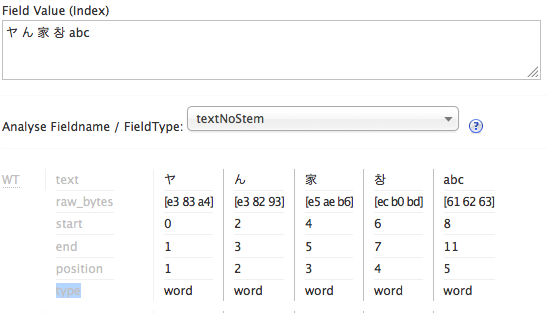
Here is output from Solr admin analysis on a string with four different CJK scripts as well as latin.  Note the type attribute, which I highlighted in the label column on the left:

b.  StandardTokenizer 

Note that the StandardTokenizer output does not separate the Hangul character from the Latin characters at the end.
c. ClassicTokenizer 

I believe ClassicTokenizer will also assign token types, probably the same way StandardTokenizer does.

The WhitespaceTokenizer is an example of a Tokenizer that does not assign the types.  I have added spaces to the string to emphasize the difference in the token types assigned:
So we probably want to use the ICUTokenizer when we use the CJKBigramFilter.

2.  ICU Script Translations

Solr makes the following script translations available via the solr.ICUTransformFilterFactory:
  1. Han Traditional <--> Simplified
  2. Katakana <--> Hiragana
We would like to get more script translations (e.g.  Han <--> Hangul, more Japanese script translations), but to my knowledge, they are not readily available via Solr at this time.

3.  ICU Folding Filter

We have already been using solr.ICUFoldingFilterFactory for case folding, e.g. normalizing "A" to "a."  Even though CJK characters don't have the concept of upper and lower case, many CJK and other Unicode characters can be expressed multiple ways by using different code point sequences.  The ICUFoldingFilter uses NFKC Unicode normalization, which does a compatibility decomposition (using a broader, "compatible" notion of character equivalence and "decomposing" to distinct code points to represent separate-able parts of a character) followed by a canonical composition (the narrower, "canonical" notion of equivalence, and the more compact code point representation of characters).  We experimented with different flavors of Unicode normalization and found NFKC to be just fine for CJK discovery purposes.  I may talk about this further in a later post.

Solr Fieldtype Definition

The example schema provided with Solr shows one way you might configure a fieldtype to do CJKBigramming:
While it does use the CJKBigramFilterFactory, there are no script translations and it isn't using the ICUFoldingFilterFactory.  Note that this email clarifies that solr.CJKWidthFilterFactory normalizations are a subset of those in solr.ICUFoldingFilterFactory.

So our improved version of the above might look like this:
Spoiler Alert:  this is NOT our final fieldtype definition.

Let's examine it more closely:
  1. positionIncrementGap attribute on fieldType
  2. This setting is all about trying to keep your matches within a single field value for a multivalued field.  Bill Dueber explains it nicely in this blog entry.  Basically, the values in a multivalued field are stored adjacently, and this setting is the number of pretend tokens between the field values.  Thus, a large value keeps phrase queries from matching some words at the end of one field value, and some words in the beginning of the following field value.  Given that we will have tons of tokens for CJK strings (roughly 2 per CJK character, from the unigrams and overlapping bigrams), setting this to a nice high value is a good idea.
  3. autoGeneratePhraseQueries attribute on fieldType
  4. As LUCENE-2458 describes, prior to Solr 3.1, if more than one token was created for whitespace delimited text, then a phrase query was automatically generated.  While this behavior is generally desired for European languages, it is not desired for CJK.  Oddly, when this bug was fixed and a configuration setting was made available, they changed the default behavior - the default is now false. "false" is the correct value for CJK, while "true" is most likely what you want in other contexts.  The Jira ticket description is pretty readable;  Tom Burton-West also mentions this in his blog, and I briefly talk about it in my blog entry about upgrading from Solr 1.4 to Solr 3.5.
  5. ICUTokenizerFactory
  6. The section above on CJKBigram analysis shows that the ICUTokenizer is likely to be better than the StandardTokenizer for tokenizing CJK characters into typed unigrams, as needed by the CJKBigramFilter.
  7. CJKWidthFilterFactory
  8. It may be that this is completely unnecessary, but on the off chance that the script translations don't accommodate half-width characters, I go ahead and normalize them here.  For the curious, written CJK characters can be very opaque, so old printers used to print each CJK character twice as wide as a Latin characters.  However, some of the simpler characters could be printed regular size, or "half-width" compared to other CJK characters. (http://en.wikipedia.org/wiki/Halfwidth_and_fullwidth_forms)
  9. ICUTransformFilterFactory  from Han traditional to simplified
  10. This is the translation of traditional Han characters to simplified Han characters, which will allow a query to match both traditional and simplified Han characters.
  11. ICUTransformFilterFactory from Katakana to Hiragana
  12. This is the translation of Katakana characters to Hiragana characters, which will allow both of these scripts to be matched when there are characters in either script in the user query.
  13. ICUFoldingFilterFactory
  14. This will perform Unicode normalization as described in the Solr solutions section above.
  15. CJKBigramFilterFactory
  16. Note the settings to bigram all four CJK scripts, and to output unigrams in addition to bigrams.
So we now have a Solr fieldtype to create overlapping bigrams as well as unigrams for CJK script characters.  Super!

Our next step is to index all of our CJK data using this fieldtype, and then to include the new CJK fields in the boosted field lists searched by our edismax request handlers.

Where is our CJK Data?

In our preliminary testing, we confirmed SOLR-3589 made our CJK search results "inexplicable" (recall that this bug being fixed only for edismax is what drove us to switch to edismax).  One way we assessed our results was by comparing them to search results in our traditional library OPAC (Symphony ILS by Sirsi if you're curious).   For some of the very small result sets (15 hits or less), we could examine why each result was included by Solr and by the ILS.   These close examinations surfaced CJK characters that weren't in the appropriate Marc linked data 880 fields, but instead were included in Marc fields 505 and 520.  Many of these records came from external vendors.  We then asked our East Asia librarians to estimate how often CJK scripts would occur outside 880s, and the guesses were about 30% of the Chinese records, 15% of the Korean records, and 5% of the Japanese records.  With this in mind, we decided to apply the text_cjk fieldtype to 505 and 520 fields in addition to 880 fields.

Our CJK Solr fields are all copy fields (more on that in a subsequent post);  here are the relevant bits from our Solr schema.xml file, in addition to the fieldtype definition for text_cjk:


Note that the dynamicField declaration has indexed=true and stored=false:  the display of CJK text in the SearchWorks application is accommodated via other fields.  This whole effort is about CJK searching.  CJK search fields must be multivalued because many of the relevant Marc fields are repeatable.

Ready, Set, Index

The next posts in the series will talk about how we evaluated our indexing viz-a-viz CJK resource discovery, what additional indexing changes were required, and surprise changes needed in the SearchWorks rails application code.

Wednesday, January 8, 2014

CJK with Solr for Libraries, part 6 (Edismax woes, part 3)

This is the sixth of a series of posts about our experiences addressing Chinese, Japanese and Korean (CJK) resource discovery in SearchWorks, the Stanford University Libraries "catalog" built with Blacklight on top of our Solr index, and the third in the sub-series on problems we had switching to  edismax from dismax.

You might be interested in this post in particular if you use Solr's edismax query parser or if you want to get more exact matches for user queries.

Edismax Woes, Part 3

In part five of this series, I showed that our edismax results needed to give more weight to exact matches in the short title field in order to fix the failing relevancy acceptance tests for journal titles (and in order to behave more like dismax).

I also mentioned that Bill Dueber of the University of Michigan wrote a wonderful blog post on using "fully-anchored" text fields to get an "exactish" match.  This blog post will cover our solution to the journal title results using a fully-anchored text field.

What Do We Mean When We Say Exact?

Recall the results for an edismax title search on 'the press':


When we say "exact" match, our spec might be this:
  1. case insensitive.  
  2. field contains only those tokens we intend to match - it matches the entire contents of the field.  
  3. punctuation insensitive  (e.g. the nation should match "The nation.")
  4. Leading, trailing and consecutive whitespace insensitive.  
  5. Unicode folding.  
  6. possibly include synonyms.
It's not a phrase match, because that doesn't cover point 2 -- we don't want the first two results returned by edismax, even though they contain the phrase "the press".

A "good enough" solution, especially for short metadata fields, is to anchor the query string to the beginning and end of the field value, and to boost this "anchored" field type very high so will dominate the score when there's a match.

Anchored Text Fieldtype

Bill's blog post does a fine job of explaining how to do this.  Essentially, you add a prefix, like 'aaaa' to the beginning of the text, and you add a suffix, like 'zzzz' to the end of the text.

In our case, we have an unstemmed text fieldtype like this:


And we want to use a PatternReplaceCharFilterFactory to add the prefix and suffix to this field.  Bill's example is nice and simple:


Note that Bill's filter adds two tokens, which will affect mm counts.

I'm going to save you a lot of time and tell you right away:  be careful about your regular expression, especially concerning punctuation and other symbol characters.  Due to the Marc metadata standard having been originally designed to accommodate the printing of catalog cards, the short title fields in Marc data (245a) often end in punctuation and/or whitespace. 

Also, I didn't want to affect mm counts, because when we do bigramming for CJK characters, mm counts are going to be plenty tricky.  So here is what my version of the PatternReplaceCharFilterFactory to add anchoring prefix and suffix ended up as:


It's ugly, but it works.  It doesn't add tokens, like Bill's does, because it adds no whitespace to the token stream. 

Let's walk through the pattern:
   ^\s*
says ignore whitespace at the beginning of the text.
   [^\.\,:;/=&lt;&gt;\(\)\[\]\&amp;\|] 
is a character class excluding these characters: .,:;/=<>(){}&|    Let's call this character class z.

z is inside another character class:
   [\S&amp;&amp;z]
which, in total, says any non-whitespace character or a doubly escaped ampersand, but none of the characters excluded by z.  Let's call this modified non-whitespace character class \S'.

So the first part
   ^\s*(.*[\S&amp;&amp;[^\.\,:;/=&lt;&gt;\(\)\[\]\&amp;\|]]) 
is simplified to
   ^\s*(.*\S')
which is saying ignore beginning whitespace and capture anything after that ending in one of the characters in \S' (the modified non-whitespace character class).

The part after the capturing group contains another character class:
   [\s\.\,:;/=&lt;&gt;\(\)\[\]\&amp;\|]
which includes:  whitespace as well as .,:;=<>()[]&|.  Let's call this character class Y.  So after the capturing group, we have:
   Y*$
which is saying to ignore any trailing characters in the Y character class.  So the whole expression simplifies to:
   ^\s*(.*\S')Y*$

So it's not really so far off from Bill's pattern.  It ignores initial whitespace, it ignores trailing whitespace and punctuation, and it captures everything in between only if it ends with a non-whitespace character other than .,:;/=<>(){}&|

So yay!  We have a charFilter to place at the beginning of the fieldtype analysis chain and we're ready to create a new field for exactish matches to address the edismax relevancy discrepancy when compared to dismax!  Our anchored text fieldtype looks like this:


And we're ready to go, right?  We re-index our data, adding a Solr field:


in which we put our short title, (245a for Marc data wonks).  Then we add this Solr field to our edismax formula with a higher boost value than the other fields used by edismax in the failing journal title relevancy tests.  We can tweak the boost value as needed, since we have a safety net of 600 relevancy tests to let us know if we're breaking existing functionality.

And all the relevancy tests now all pass, right?

Wrong.  Do you see the problem?  I didn't.

The journal title search results passed the tests (after we addressed the problem of trailing punctuation, ahem).  But then we were left with a bunch of failing synonym tests, in addition to the already failing synonym tests from our 21 tests failing with edismax.

Synonyms and Anchoring

A synonym can be thought of as a substitution.  If you have
   c++  =>  cplusplus
in your synonym file, then analysis from the text_anchored fieldtype above will change
   Great C++ programming
to
   aaaaaagreat cplusplus programmingzzzzzz
This is perfect.  But if you start with
   C++ programming
then you get
   aaaaaac programmingzzzzzz

Why?   This is where the Analysis form in the Solr admin GUI came in handy.  It tells us the analysis for the text_anchored fieldtype above proceeds like this:
   C++ programming
   aaaaaaC++ programmingzzzzzz   <== pattern replace char filter
   aaaaaaC++ programmingzzzzzz   <== whitespace tokenizer (makes 2 tokens)
   aaaaaac++ programmingzzzzzz   <== ICU folding filter
   aaaaaac++ programmingzzzzzz   <== synonym filter  (no-op) 
   aaaaaac programmingzzzzzz     <== word delimiter filter

The synonym filter doesn't find "c++" as a token, it finds "aaaaaac++" which it doesn't know about.

Because our list of synonyms is short, and because I wanted to keep synonyms in our text_anchored fieldtype, my solution was to create additional synonyms for right, left and both anchored versions of each synonym to be mapped.  This covers cases where the synonym is the first, last or only word in the token stream for the text_anchored fieldtype.  For c++, this becomes these synonyms:

   c++  =>  cplusplus
   aaaaaac++  =>  cplusplus
   c++zzzzzz  =>  cplusplus
   aaaaaac++zzzzzz  =>  cplusplus

Here is what our text_anchored fieldtype actually looks like:


(you can also look here to see it with syntax highlighting:  https://github.com/solrmarc/stanford-solr-marc/blob/master/stanford-sw/solr/conf/schema.xml#L371-388).

Edismax Woes Begone!

Recall that our goal is to improve our edismax journal title results by giving great weight to exact-ish matches of the query string in a Solr document's short title field.  We have a field type for this, per above, that we use for an "exactish" short title field (245a for Marc data wonks).  Then we add this Solr field to our edismax formula with a higher boost value than the other fields used by edismax in the failing journal title relevancy tests.  We can tweak the boost value as needed, since we have a safety net of 600 relevancy tests to let us know if we're breaking existing functionality.

This is precisely how we fixed the failing journal title tests when using edismax.

Recall that our relevancy test failures with edismax were in the following categories:
  1. Journal titles
  2. Hyphens preceded by a space (but no following space)
  3. Boolean NOT
  4. Synonyms for musical keys
We addressed the journal titles with the fully-anchored exactish matching short title field.  We determined that the hyphens and boolean NOT failures were due to a Solr bug, and that we can ignore these failures for now.  And I'll go ahead and tell you that the failing synonym test was for a musical key (F#) that also maps to a computer language, and we decided to live with that failure for now.  (Maybe I'll talk more about our synonyms in a future post.)

Relevancy/Acceptance Tests

I want to make a point of mentioning that while we were trying to figure out why searches on "the nation" were failing our tests, we had human testers looking for other errors and trying to find the pattern to the problems we were already aware of.  So we got a lot more tests for similar journal titles, such as "the sentinel," "the chronicle", "the times" (which we already had), etc.  Eventually I realized the culprit for our journal title results was the punctuation at the end of the Marc 245a fields.  But in the meantime, we beefed up our test suite in this area.

Our relevancy tests were also instrumental in determining an appropriate boost value for our new short title exactish match field, both in title searches and in "everything" searches.   I was able to find out what was too low a boost and what was too high a boost by running my test suite against different values.

And of course, our relevancy tests were crucial in my effort to simplify our boost factors.

Please feel free to take ours (https://github.com/sul-dlss/sw_index_tests) and modify them for your own needs.   Ignore the ones that don't apply to you; add tests for your local needs. Improve on my methodology.  Feel free to get in touch.

Next:  Actually Working on CJK

Now that we've gotten past the difficulties with changing from dismax to edismax query parsing, we can utilize Robert Muir's fix for SOLR-3589, the bug that was setting mm to 0 for fields using CJKBigramming (this is discussed in the second post in this series).  We also upgraded to Solr 4.3 at this point (from 3.5), partly to get Robert's bug fix without having to apply a patch to Solr manually.

So the next post in this series will return to discussing work specific to CJK.

Tuesday, January 7, 2014

CJK with Solr for Libraries, part 5 (Edismax Woes, part 2)

This is the fifth of a series of posts about our experiences addressing Chinese, Japanese and Korean (CJK) resource discovery in SearchWorks, the Stanford University Libraries "catalog" built with Blacklight on top of our Solr index, and the second in the sub-series on problems we had switching to edismax from dismax.

You might be interested in this post in particular if you use Solr's edismax query parser or if you want to get more exact matches for user queries.

Edismax Woes, Part 2

In the third part of this series, I mentioned that we had 21 relevancy acceptance tests fail when we used the edismax Solr query parser instead of dismax.  Recall that our test failures were in the following categories:
  1. Journal titles
  2. Hyphens preceded by a space (but no following space)
  3. Boolean NOT
  4. Synonyms for musical keys
This blog post will discuss how we addressed relevancy failures in the first category;  I discussed failures in categories 2 and 3 in the fourth part of this series.

Digging Into Relevancy Differences

Here is example output from some failing tests in category 1:

  rspec ./spec/journal_title_spec.rb:22 # journal titles The Nation as everything search
  rspec ./spec/journal_title_spec.rb:32 # journal titles The Nation (National stems to Nation) with format journal

I used manual searches to confirm that users would perceive the edismax results as worse than dismax.  I also tried a number of similar searches (and wrote tests) to better pinpoint this problem.

Here are the first five results for a title search on The press using using dismax and edismax with the same index:


Looking at these results, I immediately have two questions:
  1. Why are the first two results of edismax not exact title matches?
  2. Why are the scores of the three documents that appear in both sets of results different?

Edismax Formula Difference

To answer these questions, I first looked at the Solr output with debugQuery=true.  The Solr query analysis was shown as exactly the same EXCEPT for this difference noted in SOLR-2058 in the comment from Michael Dodsworth on 25 Sep/12.

I'll try to express it more succinctly (thanks to Tom Burton-West) :

Let
  A = field1:"term1 term2"
  B = field2:"term1 term2"
  C = field3:"term1 term2"

Dismax:
    DisjunctionMaxQuery (A|B|C)
  returns the score of whatever field has the highest score.

Edismax:
    DisjunctionMaxQuery (A)
    DisjunctionMaxQuery (B)
    DisjunctionMaxQuery (C)
  returns the sum of the scores of each of any of the above queries that match.  So if your phrase is in all 3 fields, you get the sum of the scores for each matched field.

Unfortunately, SOLR-2058 is marked as fixed, despite this difference.  So we have an initial diagnosis, but not a treatment plan.

Visualizations To The Rescue!

I was stumped as to what to do about the above until I used the visualizations of Solr scoring data made available at explain.solr.pl.  The full visualizations I created for scoring the top 5 results of a search for 'the press' are available here:

edismax:  http://explain.solr.pl/explains/m63o1yhg
dismax:  http://explain.solr.pl/explains/a7bkurhb

Here is the visualization of the score of the first dismax result, id 9162486 with title The press:
The score is overwhelmingly dominated by the phrase match in the unstemmed short title field, title_245a_unstem_search.  In fact, this is true for all the top 5 dismax results:  if the pie charts below weren't different colors and didn't have text labels for the tiny pie pieces, I think you'd be hard pressed to tell them apart:


However, with edismax, we have two basic patterns within the first 5 results, and the phrase match in the unstemmed short title field is not nearly as dominant:


Here is a closer look at the visualization of the score of the first edismax result, id 8192320 with title MEET THE PRESS:

What I learned from these visualizations is that to make the edismax results more like dismax, I needed a way to give more weight to exact matches of the entire string in the title_245a_unstem_search field.

Another visualization example, of the top 5 results of a search for 'the nation':

edismax:  http://explain.solr.pl/explains/6bracmzw
dismax:  http://explain.solr.pl/explains/4med7pae

Tie Parameter

"DisMax" is an abbreviation of "disjunction maximum", which is a partial description of the way user queries are turned into low level Lucene queries.  From http://wiki.apache.org/solr/DisMax, dismax is "designed to process simple user entered phrases (without heavy syntax) and search for the individual words across several fields using different weighting (boosts) based on the significance of each field."  From the same document:


So basically, dismax pays attention only to the highest scoring query match in any of the document's fields.  The tie parameter, documented here, can be used to dial up the influence of other matches:


A tie value of 0.01 was used for both dismax and edismax searches.  That value is very close to zero, so the highest scoring matching clause should already be dominating the total score.  I tried a tie value of 0.99 to see if I could make a difference in the relevancy ranking this way, and while my document scores changed, the result order remained the same.   Below are results for edismax search for 'the press' with different tie values:

tie 0.01:  http://explain.solr.pl/explains/hwi1ma6x
tie 0.99:  http://explain.solr.pl/explains/jfmdli56


I coerced a colleague into trying a similar experiment, and was able to confirm the tie parameter affected his results as expected.  Further experimentation indicated that setting the tie value to something like 0.00001 for my search DID have the effect of making the highest scoring matching clause highly dominant;  this led me to the conclusion that my field boosting values were ridiculous (as high as 200,000 !) and affected my ability to use a reasonable value for the tie parameter..

Re-adjusting Boost Values

Our boost value settings were a big nasty kludge that I partly inherited and partly created. Simplifying them was definitely in order ... but perhaps not at the same time as a change to edismax, nor during a Solr upgrade from 3.5 to Solr 4.  Sure, having about 600 relevancy tests gave me a decent amount of confidence I could revise my boost values without degrading the user experience of relevancy, but upgrading to edismax was causing me plenty of difficulty without revising boost values.

Eventually, I did greatly simplify our boost values and our relevancy tests were indispensable to that process.   Of course I de-coupled this from fixing the problems we had with edismax, and again from the Solr upgrade from 3.5 to Solr 4.  You can see our simplified boost values in our solrconfig.xml file at https://github.com/solrmarc/stanford-solr-marc/blob/master/stanford-sw/solr/conf/solrconfig-slave.xml.   The highest boost value is now 5,000, a great reduction from 200,000.

However, in terms of addressing the relevancy test failures with edismax, adjusting the boost values and the tie parameter wasn't really part of the route taken.

Back to Edismax Woes

The visualizations of Solr scores helped us see that our edismax results need to give more weight to exact matches of the entire string in the short title (title_245a_unstem_search) field.  The tie parameter wasn't really working for us.  What now?

Bill Dueber of the University of Michigan wrote a wonderful blog post on using "fully-anchored" text fields to get an "exactish" match.   This approach seemed well worth a try.  I will discuss our fully-anchored solution in the next post in this series.

Monday, January 6, 2014

CJK with Solr for Libraries, part 4 (Edismax Woes, part 1)

This is the fourth of a series of posts about our experiences addressingChinese, Japanese and Korean (CJK) resource discovery in SearchWorks, the Stanford University Libraries "catalog" built with Blacklight on top of our Solr index.

You might be interested in this post in particular if you use Solr's edismax query parser.

Edismax Woes, Part 1

In the third part of this series, I mentioned that we had 21 relevancy acceptance tests fail when we used the edismax Solr query parser instead of dismax.   If I inserted the "e" in my solrconfig, I would see these test failures;  if I removed the "e", the tests would pass.  I had heard "edismax is better", but here I had proof positive that edismax was WORSE.

Our relevancy problems with edismax were unexpected blockers to improving CJK resource discovery:  recall that edismax is required to fix relevancy when using the CJKBigram filter (SOLR-3589) as mentioned in part two of this series.

I believe the intent is for edismax to be an exact equivalent of dismax with additional features ... but this is not true at this time.  It turns out that edismax has a number of unresolved bugs and unimplemented features (see SOLR-2368).

Recall that our test failures were in the following categories:
  1. Journal titles
  2. Hyphens preceded by a space (but no following space)
  3. Boolean NOT
  4. Synonyms for musical keys
I will discuss categories 2 and 3 in this blog post.

Edismax Bug with Boolean Operators

One of the unresolved bugs with edismax (see SOLR-2368 for a comprehensive list) is SOLR-2649, "MM ignored in edismax queries with operators."  This bug essentially means that if a Boolean operator, such as NOT or OR appears in the query string, then all terms in the query are effectively "OR'ed" together.  Note that 'AND' is unaffected;  the four operators affected are:  NOT, OR, - (prohibited), + (required). 

It turns out that all of our failing hyphen tests were queries with a space before but not after the hyphen, such as 'under the sea -wind.'   Solr interprets such a hyphen as a "prohibited" operator, which is the same as NOT, and such hyphens are included in bug SOLR-2649.  Thus, our failure categories 2 and 3 are essentially the same. 

Our default operator is AND and we set lowercaseOperators to false (see http://wiki.apache.org/solr/ExtendedDisMax#lowercaseOperators), so the SOLR-2649 bug means any query with terms of uppercase OR or NOT or a '-' or '+' character preceding a term gives unexpected results, unless the query has either explicit AND or explicit '+' for all other terms.  Our mm setting is 6<-1 6<90%, or high enough that 4 terms should be AND'ed together.

Here are some illustrative example user queries, how they are analyzed by Solr (via debugQuery=true), and the results:

DISMAX:
  q=customer driven academic library
    +(((custom)~0.01 (driven)~0.01 (academ)~0.01 (librari)~0.01)~4) ()
    4 hits
  q=customer NOT driven academic library:
    +(((custom)~0.01 -(driven)~0.01 (academ)~0.01 (librari)~0.01)~3) ()
    96 hits
  q=customer -driven academic library:
    +(((custom)~0.01 -(driven)~0.01 (academ)~0.01 (librari)~0.01)~3) ()
    96 hits
  q=customer academic library:
    +(((custom)~0.01 (academ)~0.01 (librari)~0.01)~3)()
    100 hits

EDISMAX
  q=customer driven academic library:
    +(((custom)~0.01 (driven)~0.01 (academ)~0.01 (librari)~0.01)~4)  
    4 hits
  q=customer NOT driven academic library:
    +((custom)~0.01 -(driven)~0.01 (academ)~0.01 (librari)~0.01)  
    984300 hits
  q=customer -driven academic library:
    +((custom)~0.01 -(driven)~0.01 (academ)~0.01 (librari)~0.01)
    984300 hits
  q=customer OR academic OR library NOT driven:
    +((custom)~0.01 (academ)~0.01 (librari)~0.01 -(driven)~0.01)
    984300 hits
  q=customer academic library:
     +(((custom)~0.01 (academ)~0.01 (librari)~0.01)~3)
    100 hits

You can see that the mm is missing from the middle 3 edismax queries (no ~3 term);  this is the manifestation of the bug.  You can also see how the number of results would be confusing to an end user.

Great - now we have learned there is a known Solr bug, and we understand its scope.  What shall we do?  The first, best option would be for someone else to fix the problem.  Given that the bug report is from July 2011 and heavily commented, that seems unlikely to happen soon.  The next best option is to fix the problem myself.  However, having already looked at the source code for edismax, I pale at the very thought.  

So I took a different tack:  I examined whether we had a significant number of user queries impacted by this bug.

Will Our Users Encounter this Bug?

Prior to the CJK improvements, SearchWorks has only supported boolean operators in its Advanced search.  Our usage data from July 2013 - November 2013, shows "advanced" is the initial search behavior somewhere between 6% and 18% of the time.   For example, here are stats for initial search behavior in July 2013:


And the analogous data for November 2013:


So let's be generous, and say that 20% of the SearchWorks queries use the boolean-enabled advanced searches.  Of those, how many contain boolean?

We looked at 10,000 advanced search queries culled from Google Analytics from July, 2013.  (Note that this could have been done via the Solr logs, but we have a load balanced Solr set up so it would have involved getting logs from 3 machines and their backups ... so we just went with Google Analytics.)  Using grep, we determined the following occurrences of the affected operators in an advanced search where SOLR-2649 might apply:

Thus, the boolean operators affected by SOLR-2649 occur extremely rarely in SearchWorks advanced search queries, which are themselves, at best 20% of our queries.

Armed with this data, we chose to let this remain broken in SearchWorks for the time being, so the failing relevancy tests in categories two and three above have been resolved as "do not fix" until the Solr bug is addressed.

Stay Tuned ...

In my next post, I will tackle the first category of failing relevancy tests, which required a work around to avoid degrading relevancy for our users when we switched to edismax.